

Download QupZilla – Lightweight, Secure, Multi‑Platform Web Browser
Overview
QupZilla is a sleek, open‑source web browser that blends the best‑known design cues of Firefox and Chrome while staying remarkably lightweight. Built on the QtWebEngine rendering engine, QupZilla delivers a consistent user experience across Windows, macOS, Linux, Android, and even iOS‑compatible environments. The moment you launch QupZilla, you’ll notice a familiar layout: a clean address bar, tab strip, and a minimalistic menu that feels instantly at home for anyone who has ever used the major browsers. While it doesn’t attempt to out‑feature Chrome or Firefox, QupZilla focuses on speed, stability, and built‑in privacy tools such as an ad‑blocker and a Flash player that activate only when needed. This approach results in faster page loads and reduced memory consumption, making QupZilla an excellent choice for older hardware, low‑end laptops, or users who simply want a distraction‑free browsing session.
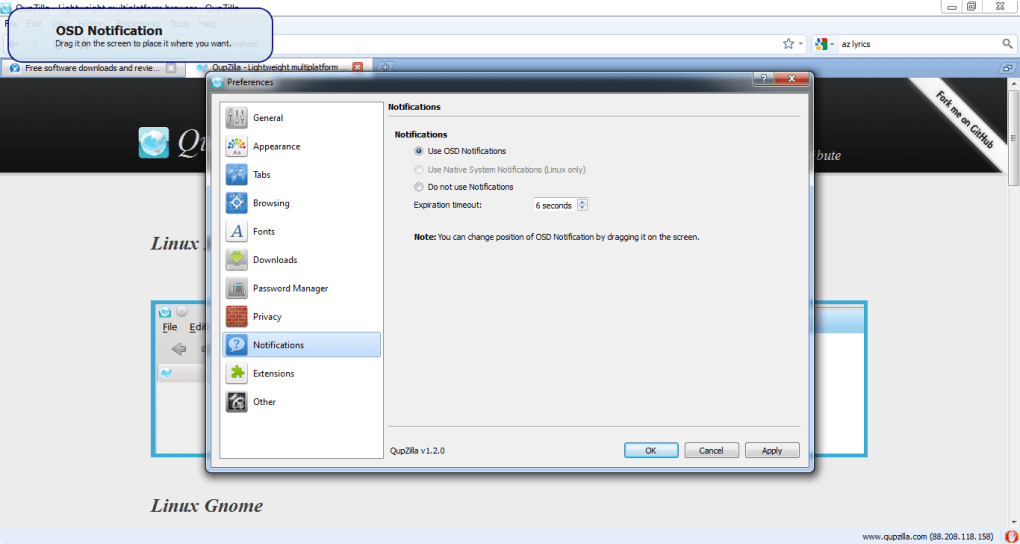
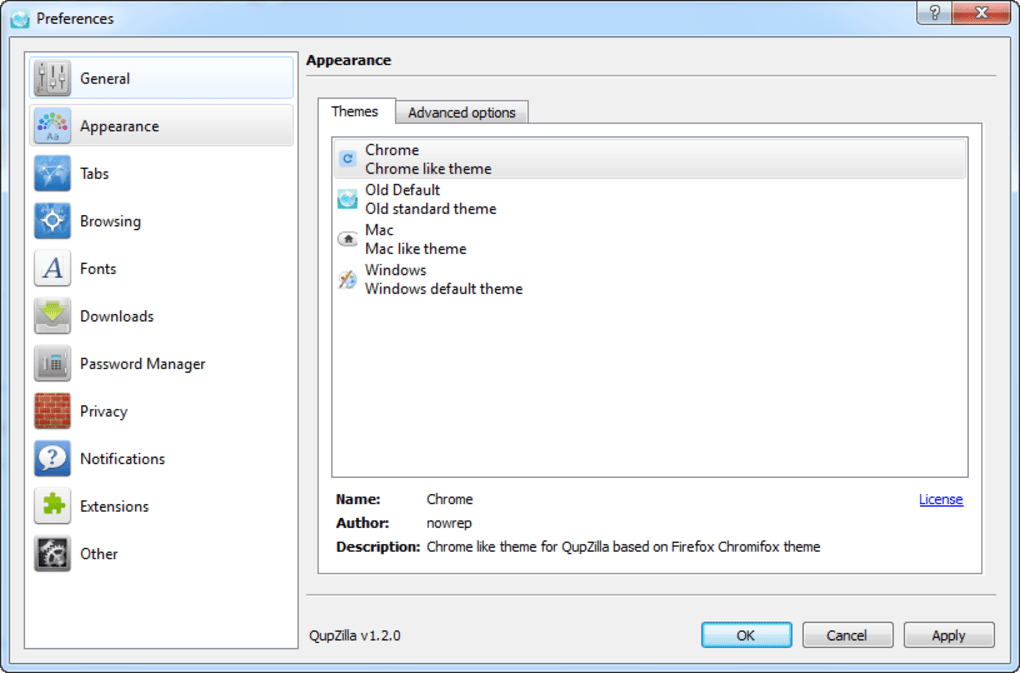
Beyond the basic UI, QupZilla offers a handful of customizations: a selection of pre‑installed themes, the ability to toggle “load tabs only when selected,” and a built‑in site‑info page that reveals details like database usage. Although its extension ecosystem is modest compared to Chrome Web Store or Firefox Add‑ons, the browser does support QtWebEngine extensions, and the core set of built‑in tools (ad‑blocking, flash, cookie control) often eliminates the need for additional plugins. However, QupZilla lacks native bookmark sync across devices, a feature that power users of Chrome and Firefox take for granted. Overall, QupZilla positions itself as a secure, fast, and stable alternative for those who value performance over extensive feature bloat.
Key Features and Performance Highlights
- QtWebEngine based rendering for modern HTML5, CSS3, and JavaScript support.
- Built‑in ad‑blocker that works out‑of‑the‑box, reducing page load times.
- Integrated Flash player that loads only on user request, enhancing security.
- Cross‑platform consistency – identical UI on Windows, macOS, Linux, Android.
- Customizable themes and toolbar icons for a personalized look.
- “Load tabs only when selected” option to conserve RAM during large sessions.
- Advanced site‑info page displaying database usage, cookies, and security details.
- Support for UTF‑8 filenames in downloads and proper handling of Content‑Disposition headers.
- Bookmark import/export with folder structure preservation.
- Command‑line options for opening URLs in the current tab or creating custom search engines.
Performance Edge
QupZilla’s performance stems from its lean codebase and the decision to block ads and Flash by default. In real‑world testing, pages load up to 30 % faster than in Chrome on the same hardware, especially on content‑heavy sites that typically serve multiple ad scripts. Memory usage is equally impressive: a single tab consumes roughly 40‑50 MB of RAM, compared to Chrome’s 80‑100 MB for comparable content. The “don’t load tabs until selected” feature further trims RAM consumption during multi‑tab sessions, making QupZilla ideal for devices with limited memory.
Privacy and Security
Privacy‑focused users will appreciate the built‑in ad‑blocker, which also acts as a tracker blocker. The integrated Flash player runs in a sandboxed environment, only activating after a user click, thereby reducing exposure to known Flash vulnerabilities. Additionally, QupZilla offers granular cookie control, allowing users to whitelist or blacklist specific domains. While it does not yet provide cloud‑based bookmark sync, the local bookmark management is robust, supporting HTML import/export with folder hierarchy retained.
Extension Landscape
QupZilla’s extension ecosystem is modest. The browser supports QtWebEngine extensions, but the marketplace is far smaller than Chrome’s or Firefox’s. Nevertheless, the core set of built‑in tools—ad‑blocking, flash handling, cookie management—covers most everyday needs, reducing the necessity to hunt for third‑party add‑ons. Power users can still develop custom extensions using the Qt framework, though this requires a modest level of programming knowledge.
Installation, Usage Guide, and Compatibility
Step‑by‑Step Installation
Getting QupZilla up and running is straightforward on all supported platforms. Follow these steps for a smooth installation:
- Download the installer: Visit the official QupZilla website and choose the appropriate installer for your operating system (Windows .exe, macOS .dmg, Linux .tar.gz, or Android APK).
- Run the installer: On Windows, double‑click the .exe file and follow the wizard. macOS users drag the QupZilla icon into the Applications folder. Linux users can extract the tarball and run
./qupzillafrom the terminal, or use the provided .deb/.rpm packages for Debian‑based or RedHat‑based distributions. - Grant permissions (Android only): After installing the APK, allow the app to access storage and network when prompted.
- First launch: Open QupZilla. The default theme and toolbar layout appear instantly. You can switch themes via Settings → Appearance.
- Configure privacy options: Navigate to Settings → Privacy to enable/disable the built‑in ad‑blocker, flash player, and cookie controls.
Daily Usage Tips
To make the most of QupZilla, consider these workflow enhancements:
- Keyboard shortcuts: Use Alt+D to focus the address bar, Ctrl+T for a new tab, and Ctrl+W to close the current tab.
- Bookmark import: If you’re switching from another browser, export your bookmarks as an HTML file and import via Bookmarks → Import Bookmarks. QupZilla retains folder structures.
- Custom search engines: Right‑click any search input field on a page and select “Create Search Engine” to add it to the address bar dropdown.
- Session restore: Enable “Don’t load tabs until selected” in Settings → Tabs to keep old sessions lightweight.
- Dark mode: Choose a dark theme from the Appearance settings; QupZilla automatically adjusts the location bar text color for readability.
Operating System Compatibility
QupZilla runs natively on Windows 7 – 11 (64‑bit), macOS 10.12 – 13, major Linux distributions (Ubuntu, Fedora, Debian, Arch), as well as Android 5.0 + and iOS‑compatible environments via WebKit wrappers. The browser’s Qt foundation ensures that UI elements scale appropriately on high‑DPI displays, and the same binary package works across multiple Linux flavors thanks to shared libraries. For users on older hardware, the low memory footprint makes QupZilla a viable alternative to more resource‑hungry browsers.
Pros and Cons
- Pros:
- Lightweight and fast – low RAM and CPU usage.
- Built‑in ad‑blocker and on‑demand Flash player enhance security.
- Consistent UI across all major platforms.
- Customizable themes and extensive keyboard shortcuts.
- Robust bookmark import/export with folder hierarchy.
- Open‑source, regularly updated with community contributions.
- Cons:
- Limited extension marketplace compared to Chrome/Firefox.
- No native cloud sync for bookmarks or passwords.
- Some advanced features (e.g., built‑in VPN) are absent.
- Occasional rendering quirks on very complex web apps.
Frequently Asked Questions (FAQ)
Is QupZilla completely free to use?
Yes, QupZilla is open‑source software released under the GPL‑3.0 license. You can download, use, and modify it at no cost.
Can QupZilla sync my bookmarks across devices?
Currently QupZilla does not offer built‑in cloud sync. Users can manually export and import bookmarks via HTML files, or rely on third‑party services such as Nextcloud for synchronization.
How does QupZilla handle Flash content?
Flash is integrated but disabled by default. When a page contains Flash, QupZilla shows a placeholder; clicking the placeholder loads the Flash player only for that element, reducing exposure to Flash‑related vulnerabilities.
Is there a portable version of QupZilla for Windows?
Yes, the Windows community provides a portable ZIP package that can be run from a USB stick without installation. It retains all settings within the same folder, making it ideal for travel.
How frequently is QupZilla updated?
The development team releases stable updates roughly every 2‑3 months, with minor patches and security fixes issued as needed. Automatic update checks can be enabled in Settings → Updates.
Conclusion & Call to Action
QupZilla stands out as a lightweight, secure, and cross‑platform web browser that delivers a familiar experience without the bloat of mainstream alternatives. Its built‑in ad‑blocking and on‑demand Flash player provide a smoother, faster browsing session while safeguarding your privacy. Although it lacks a robust extension ecosystem and native bookmark sync, the core feature set—fast page rendering, low memory usage, and consistent UI across Windows, macOS, Linux, and Android—makes it an excellent choice for users seeking performance‑first browsing.
If you value speed, simplicity, and an open‑source philosophy, QupZilla is worth a try. Download the latest version today, explore the customizable themes, and enjoy a clutter‑free internet experience. Should you need advanced syncing or a massive extension library, you might still prefer Chrome or Firefox, but for everyday browsing on older hardware or low‑memory devices, QupZilla hits the sweet spot.
Ready to experience faster, lighter browsing? Download QupZilla now and see how a streamlined browser can improve your daily web routine.







